
PPIO 上线 PaddleOCR-VL-1.5 :小参数高性能 | 一键部署

PPIO 算力市场首发上线了 PaddleOCR-VL-1.5 模型模板。
作为 PaddleOCR-VL 系列的全新迭代版本,PaddleOCR-VL-1.5 在保持 0.9B 轻量级参数的同时,性能实现了显著提升 。在权威评测集 OmniDocBench v1.5 上,该模型取得了 94.5% 的精度,优于当前主流的通用大模型及文档解析专用模型。
该模型创新性地支持了文档元素的异形框定位,在扫描、倾斜、弯折、屏幕拍摄及复杂光照等真实落地场景中表现出色,能够精准返回多边形检测框。此外,模型还新增了印章识别与文本行定位功能,并优化了生僻字、古籍及多语种表格的解析效果。
现在,您可以通过 PPIO 算力市场的 PaddleOCR-VL-1.5 模板,将该模型一键部署在 GPU 云服务器上。只需简单几步,即可快速体验模型高效的文档解析能力。
一键部署地址:https://ppio.com/gpu-instance/console/explore
#01 GPU 实例+模板,一键部署 PaddleOCR-VL-1.5
step 1: 子模版市场选择对应模板,并使用此模板。
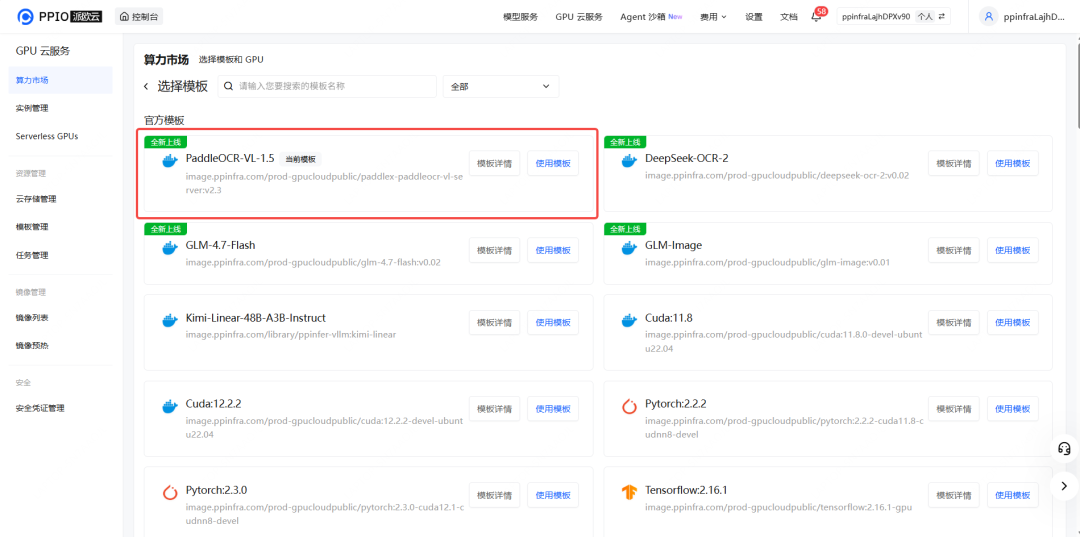
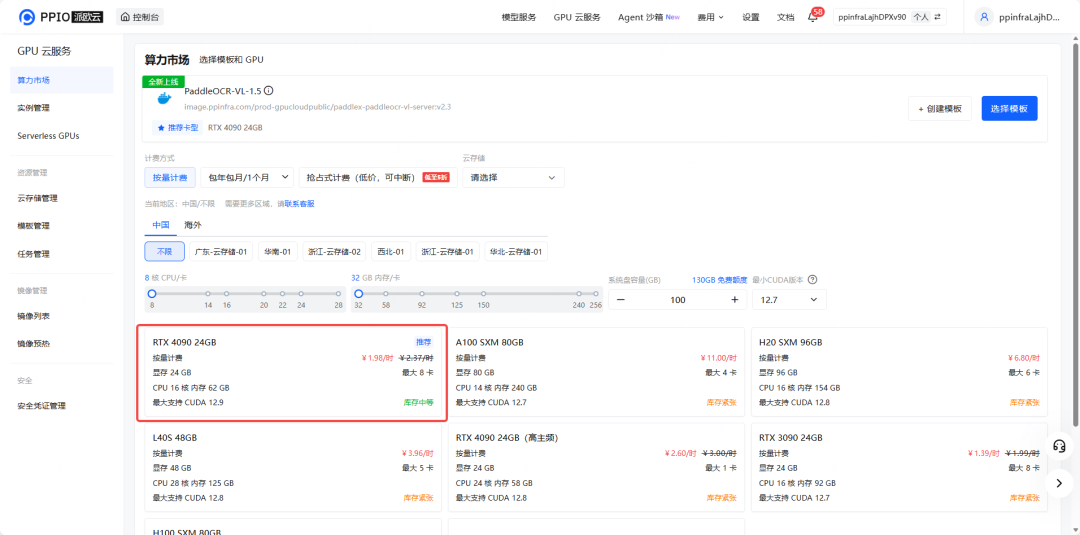
step 2: 按照所需配置点击部署。
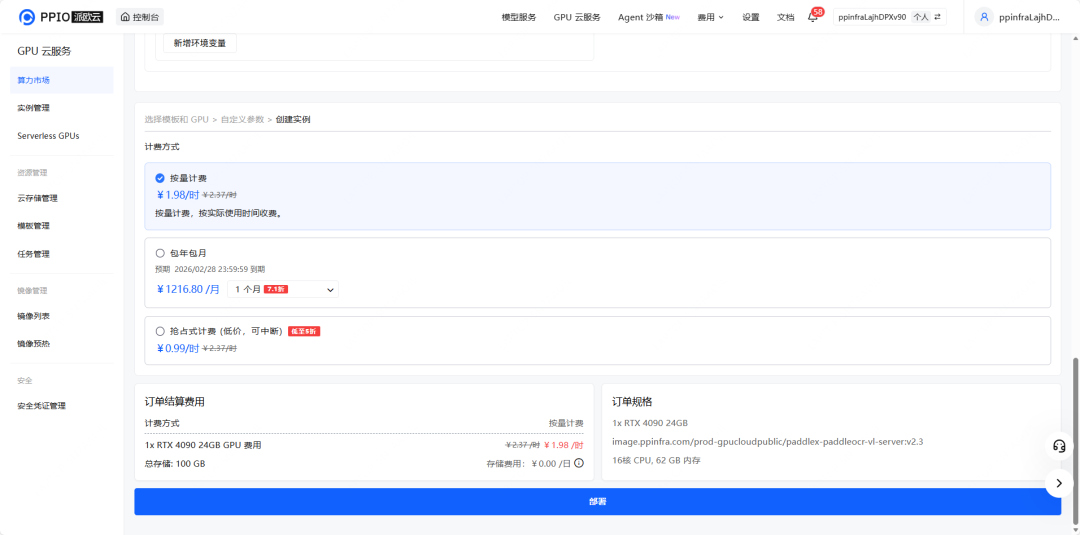
step 3: 检查磁盘大小等信息,确认无误后点击下一步。
step 4: 稍等一会,实例创建需要一些时间。
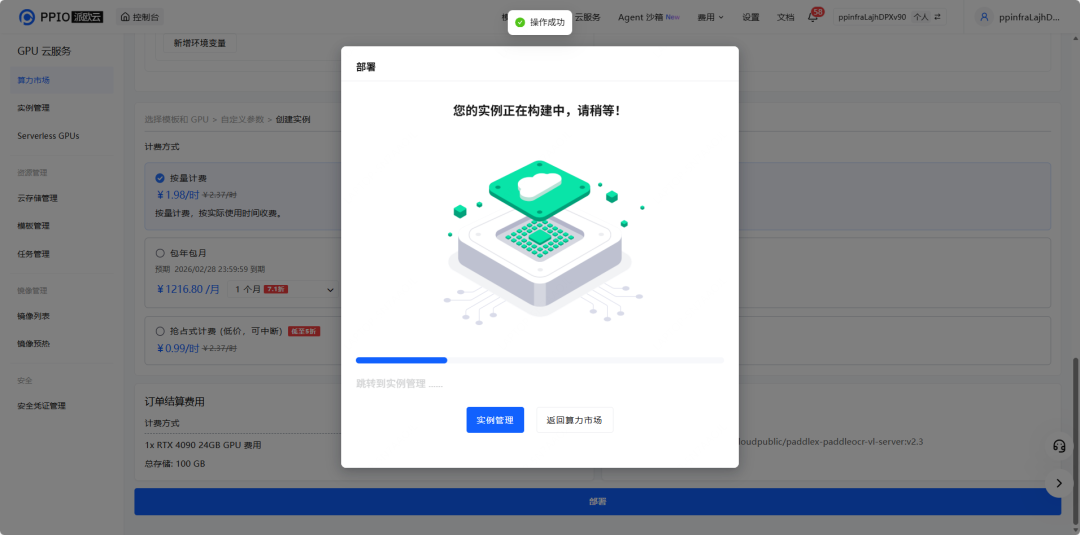
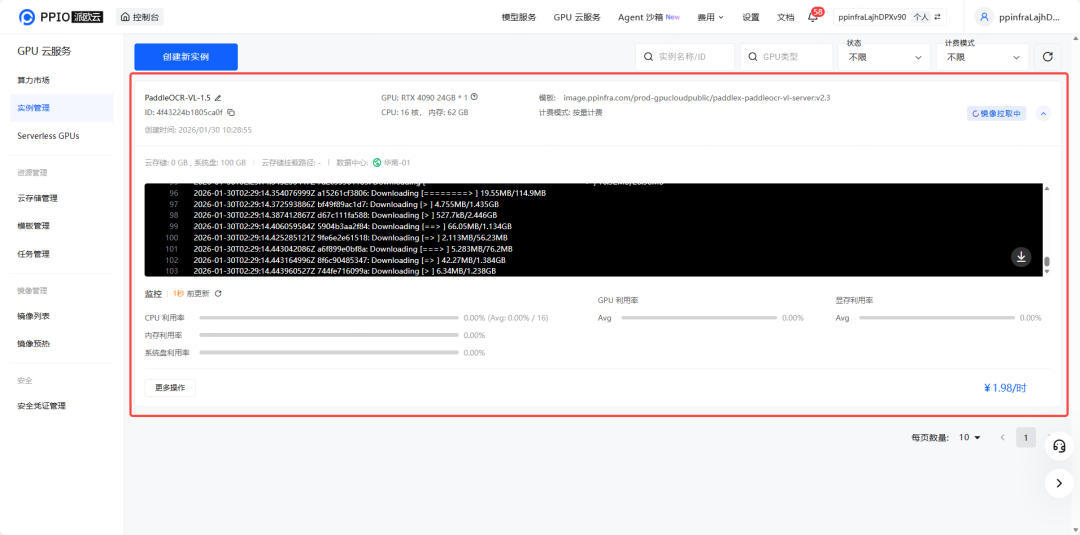
step 5: 在实例管理里可以查看到所创建的实例。
#02 使用示例
第一步
测试用例如下,后续将被命名为 test.py。
import base64
import requests
import pathlib

API_URL = "http://localhost:8080/layout-parsing"  # Service URL

image_path = "./demo.jpg"

# Encode local image to Base64
with open(image_path, "rb") as file:
    image_bytes = file.read()
    image_data = base64.b64encode(image_bytes).decode("ascii")

payload = {
    "file": image_data,  # Base64 encoded file content or file URL
    "fileType": 1,  # File type, 1 means image file
}

# Call the API
response = requests.post(API_URL, json=payload)

# Process the API response data
assert response.status_code == 200
result = response.json()["result"]
for i, res in enumerate(result["layoutParsingResults"]):
    print(res["prunedResult"])
    md_dir = pathlib.Path(f"markdown_{i}")
    md_dir.mkdir(exist_ok=True)
    (md_dir / "doc.md").write_text(res["markdown"]["text"])
    for img_path, img in res["markdown"]["images"].items():
        img_path = md_dir / img_path
        img_path.parent.mkdir(parents=True, exist_ok=True)
        img_path.write_bytes(base64.b64decode(img))
    print(f"Markdown document saved at {md_dir / 'doc.md'}")
    for img_name, img in res["outputImages"].items():
        img_path = f"{img_name}_{i}.jpg"
        pathlib.Path(img_path).parent.mkdir(exist_ok=True)
        with open(img_path, "wb") as f:
            f.write(base64.b64decode(img))
        print(f"Output image saved at {img_path}")
第二步
准备OCR所需的图片 这里使用的是官方案例
https://github.com/PaddlePaddle/PaddleOCR/blob/main/tests/test_files/book.jpg
curl https://raw.githubusercontent.com/PaddlePaddle/PaddleOCR/main/tests/test_files/book.jpg -o demo.jpg
复制端口映射地址并在 test.py 文件中替换 API URL
第三步
运行 python test.py 检查输出结果
$ python test.py
{'page_count': None, 'width': 1100, 'height': 708, 'model_settings': {'use_doc_preprocessor': False, 'use_layout_detection': True, 'use_chart_recognition': False, 'use_seal_recognition': False, 'use_ocr_for_image_block': False, 'format_block_content': False, 'merge_layout_blocks': True, 'markdown_ignore_labels': ['number', 'footnote', 'header', 'header_image', 'footer', 'footer_image', 'aside_text'], 'return_layout_polygon_points': True}, 'parsing_res_list': [{'block_label': 'text', 'block_content': "chances of the lottery jachts are also use combination formulas to work out the chances of the other prizes, but it all starts to get a bit fiddly so we'll move on to something else. (How to work out the other lottery chances is just one of the amazing features you'll find at: www.murderousmaths.co.uk)", 'block_bbox': [180, 0, 512, 109], 'block_id': 0, 'block_order': 1, 'group_id': 0, 'block_polygon_points': [[180.0, 0.0], [512.0, 0.0], [512.0, 109.0], [180.0, 109.0]]}, {'block_label': 'paragraph_title', 'block_content': 'The disappearing sum', 'block_bbox': [180, 113, 310, 137], 'block_id': 1, 'block_order': 2, 'group_id': 1, 'block_polygon_points': [[179.04934692382812, 119.45269012451172], [308.8138122558594, 110.3464126586914], [310.1516418457031, 129.41043090820312], [180.38717651367188, 138.51669311523438]]}, {'block_label': 'text', 'block_content': "It's Friday evening. The lovely Veronica Gumfloss has been out with the football team who have all escorted her safely back to her doorstep. It's that tender moment when each hopeful player closes his eyes and leans forward with quivering lips. Unfortunately Veronica's parents heard them clumping down the road and Veronica knows she only has time to kiss four out of the eleven of them if she's going to do it properly.", 'block_bbox': [175, 126, 505, 289], 'block_id': 2, 'block_order': 3, 'group_id': 2, 'block_polygon_points': [[175, 137], [175, 281], [499, 285], [504, 134], [455, 126], [302, 126]]}, {'block_label': 'image', 'block_content': '', 'block_bbox': [179, 282, 491, 471], 'block_id': 3, 'block_order': None, 'group_id': 3, 'block_polygon_points': [[179.0, 282.0], [491.0, 282.0], [491.0, 471.0], [179.0, 471.0]]}, {'block_label': 'vision_footnote', 'block_content': "How many choices has she got? It's  $ ^{11}C_{4} $ which is  $ ^{111}4l \\times 7 $ but for goodness sake DON'T reach for the calculator! The most brilliant thing about perms and", 'block_bbox': [164, 455, 493, 531], 'block_id': 4, 'block_order': None, 'group_id': 4, 'block_polygon_points': [[164, 459], [164, 505], [345, 527], [492, 527], [492, 474], [377, 470], [323, 466], [246, 459], [207, 455], [170, 455]]}, {'block_label': 'number', 'block_content': '94', 'block_bbox': [301, 546, 326, 563], 'block_id': 5, 'block_order': None, 'group_id': 5, 'block_polygon_points': [[301.0, 546.0], [325.0, 546.0], [325.0, 562.0], [301.0, 562.0]]}, {'block_label': 'text', 'block_content': "means that EVERYTHING ON THE BOTTOM ALWAYS CANCELS OUT! It's probably the best fun you'll ever have with a pencil so here we go...", 'block_bbox': [552, 0, 892, 85], 'block_id': 6, 'block_order': 4, 'group_id': 6, 'block_polygon_points': [[552.6058349609375, -9.254895210266113], [895.4388427734375, 13.18508529663086], [890.72705078125, 85.17122650146484], [547.89404296875, 62.73124313354492]]}, {'block_label': 'display_formula', 'block_content': ' $$ \\frac{11!}{4!\\times7!}=\\quad\\frac{11\\times10\\times9\\times8\\times7\\times6\\times5\\times4\\times3\\times2\\times1}{4\\times3\\times2\\times1\\times7\\times6\\times5\\times4\\times3\\times2\\times1} $$ ', 'block_bbox': [573, 74, 880, 128], 'block_id': 7, 'block_order': 5, 'group_id': 7, 'block_polygon_points': [[573, 89], [573, 109], [650, 113], [700, 117], [879, 127], [879, 96], [869, 92], [770, 85], [688, 78], [644, 74], [579, 74]]}, {'block_label': 'text', 'block_content': "(Before we continue, grab this book and show somebody this sum. Rub their face on it if you need to and tell them that this is the sort of thing you do for fun without a calculator these days because you're so brilliant.)", 'block_bbox': [550, 123, 889, 219], 'block_id': 8, 'block_order': 6, 'group_id': 8, 'block_polygon_points': [[550, 123], [550, 204], [660, 208], [883, 218], [888, 141], [697, 127], [648, 123]]}, {'block_label': 'text', 'block_content': "Off we go then. For starters we'll get rid of the 7! bit from top and bottom and get:", 'block_bbox': [549, 203, 887, 253], 'block_id': 9, 'block_order': 7, 'group_id': 9, 'block_polygon_points': [[549, 203], [549, 238], [886, 252], [886, 218], [792, 214], [676, 207]]}, {'block_label': 'display_formula', 'block_content': ' $$ \\frac{11\\times10\\times9\\times8}{4\\times3\\times2\\times1} $$ ', 'block_bbox': [677, 255, 769, 292], 'block_id': 10, 'block_order': 8, 'group_id': 10, 'block_polygon_points': [[677.0, 255.0], [769.0, 255.0], [769.0, 292.0], [677.0, 292.0]]}, {'block_label': 'text', 'block_content': "Pow! That's already got rid of more than half the numbers. Next we'll see that the  $ 4 \\times 2 $ on the bottom cancels out the 8 on top (and we don't need that “×1” on the bottom either). We're left with...", 'block_bbox': [547, 300, 886, 376], 'block_id': 11, 'block_order': 9, 'group_id': 11, 'block_polygon_points': [[547.0, 299.99993896484375], [886.40771484375, 307.02911376953125], [885.0, 375.0], [545.59228515625, 367.9708251953125]]}, {'block_label': 'display_formula', 'block_content': ' $$ \\frac{11\\times10\\times9}{3} $$ ', 'block_bbox': [685, 384, 756, 417], 'block_id': 12, 'block_order': 10, 'group_id': 12, 'block_polygon_points': [[685.0, 384.0], [756.0, 384.0], [756.0, 417.0], [685.0, 417.0]]}, {'block_label': 'text', 'block_content': "Then the 3 on the bottom divides into the 9 on top leaving it as a 3 so all we've got now is:", 'block_bbox': [545, 429, 884, 468], 'block_id': 13, 'block_order': 11, 'group_id': 13, 'block_polygon_points': [[545.0, 429.0], [884.0, 429.0], [884.0, 468.0], [545.0, 468.0]]}, {'block_label': 'text', 'block_content': "Veronica's choices = 11 × 10 × 3", 'block_bbox': [618, 477, 817, 496], 'block_id': 14, 'block_order': 12, 'group_id': 14, 'block_polygon_points': [[618.0, 477.0], [816.0, 477.0], [816.0, 495.0], [618.0, 495.0]]}, {'block_label': 'text', 'block_content': 'Look! No bottom.', 'block_bbox': [543, 508, 666, 529], 'block_id': 15, 'block_order': 13, 'group_id': 15, 'block_polygon_points': [[542.9999389648438, 508.0], [664.9999389648438, 508.0], [664.9999389648438, 528.0], [542.9999389648438, 528.0]]}, {'block_label': 'number', 'block_content': '95', 'block_bbox': [705, 555, 729, 571], 'block_id': 16, 'block_order': None, 'group_id': 16, 'block_polygon_points': [[705.0, 555.0], [728.0, 555.0], [728.0, 570.0], [705.0, 570.0]]}, {'block_label': 'image', 'block_content': '', 'block_bbox': [938, 0, 1099, 647], 'block_id': 17, 'block_order': None, 'group_id': 17, 'block_polygon_points': [[938.0, -2.0], [1099.0, -2.0], [1099.0, 647.0], [938.0, 647.0]]}], 'layout_det_res': {'boxes': [{'cls_id': 22, 'label': 'text', 'score': 0.9220595955848694, 'coordinate': [180, 0, 512, 109], 'order': 1, 'polygon_points': [[180.0, 0.0], [512.0, 0.0], [512.0, 109.0], [180.0, 109.0]]}, {'cls_id': 17, 'label': 'paragraph_title', 'score': 0.8456085920333862, 'coordinate': [180, 113, 310, 137], 'order': 2, 'polygon_points': [[179.04934692382812, 119.45269012451172], [308.8138122558594, 110.3464126586914], [310.1516418457031, 129.41043090820312], [180.38717651367188, 138.51669311523438]]}, {'cls_id': 22, 'label': 'text', 'score': 0.9213816523551941, 'coordinate': [175, 126, 505, 289], 'order': 3, 'polygon_points': [[175, 137], [175, 281], [499, 285], [504, 134], [455, 126], [302, 126]]}, {'cls_id': 14, 'label': 'image', 'score': 0.9448813199996948, 'coordinate': [179, 282, 491, 471], 'order': None, 'polygon_points': [[179.0, 282.0], [491.0, 282.0], [491.0, 471.0], [179.0, 471.0]]}, {'cls_id': 24, 'label': 'vision_footnote', 'score': 0.8173566460609436, 'coordinate': [164, 455, 493, 531], 'order': None, 'polygon_points': [[164, 459], [164, 505], [345, 527], [492, 527], [492, 474], [377, 470], [323, 466], [246, 459], [207, 455], [170, 455]]}, {'cls_id': 16, 'label': 'number', 'score': 0.7621420621871948, 'coordinate': [301, 546, 326, 563], 'order': 4, 'polygon_points': [[301.0, 546.0], [325.0, 546.0], [325.0, 562.0], [301.0, 562.0]]}, {'cls_id': 22, 'label': 'text', 'score': 0.913713276386261, 'coordinate': [552, 0, 892, 85], 'order': 5, 'polygon_points': [[552.6058349609375, -9.254895210266113], [895.4388427734375, 13.18508529663086], [890.72705078125, 85.17122650146484], [547.89404296875, 62.73124313354492]]}, {'cls_id': 5, 'label': 'display_formula', 'score': 0.8774852156639099, 'coordinate': [573, 74, 880, 128], 'order': 6, 'polygon_points': [[573, 89], [573, 109], [650, 113], [700, 117], [879, 127], [879, 96], [869, 92], [770, 85], [688, 78], [644, 74], [579, 74]]}, {'cls_id': 22, 'label': 'text', 'score': 0.9250841736793518, 'coordinate': [550, 123, 889, 219], 'order': 7, 'polygon_points': [[550, 123], [550, 204], [660, 208], [883, 218], [888, 141], [697, 127], [648, 123]]}, {'cls_id': 22, 'label': 'text', 'score': 0.8921533823013306, 'coordinate': [549, 203, 887, 253], 'order': 8, 'polygon_points': [[549, 203], [549, 238], [886, 252], [886, 218], [792, 214], [676, 207]]}, {'cls_id': 5, 'label': 'display_formula', 'score': 0.7999240159988403, 'coordinate': [677, 255, 769, 292], 'order': 9, 'polygon_points': [[677.0, 255.0], [769.0, 255.0], [769.0, 292.0], [677.0, 292.0]]}, {'cls_id': 22, 'label': 'text', 'score': 0.9141753315925598, 'coordinate': [547, 300, 886, 376], 'order': 10, 'polygon_points': [[547.0, 299.99993896484375], [886.40771484375, 307.02911376953125], [885.0, 375.0], [545.59228515625, 367.9708251953125]]}, {'cls_id': 5, 'label': 'display_formula', 'score': 0.849932074546814, 'coordinate': [685, 384, 756, 417], 'order': 11, 'polygon_points': [[685.0, 384.0], [756.0, 384.0], [756.0, 417.0], [685.0, 417.0]]}, {'cls_id': 22, 'label': 'text', 'score': 0.8802617192268372, 'coordinate': [545, 429, 884, 468], 'order': 12, 'polygon_points': [[545.0, 429.0], [884.0, 429.0], [884.0, 468.0], [545.0, 468.0]]}, {'cls_id': 22, 'label': 'text', 'score': 0.7239603400230408, 'coordinate': [618, 477, 817, 496], 'order': 13, 'polygon_points': [[618.0, 477.0], [816.0, 477.0], [816.0, 495.0], [618.0, 495.0]]}, {'cls_id': 22, 'label': 'text', 'score': 0.8236865997314453, 'coordinate': [543, 508, 666, 529], 'order': 14, 'polygon_points': [[542.9999389648438, 508.0], [664.9999389648438, 508.0], [664.9999389648438, 528.0], [542.9999389648438, 528.0]]}, {'cls_id': 16, 'label': 'number', 'score': 0.552054762840271, 'coordinate': [705, 555, 729, 571], 'order': 15, 'polygon_points': [[705.0, 555.0], [728.0, 555.0], [728.0, 570.0], [705.0, 570.0]]}, {'cls_id': 14, 'label': 'image', 'score': 0.8069510459899902, 'coordinate': [938, 0, 1099, 647], 'order': None, 'polygon_points': [[938.0, -2.0], [1099.0, -2.0], [1099.0, 647.0], [938.0, 647.0]]}]}}
Markdown document saved at markdown_0/doc.md
Output image saved at layout_det_res_0.jpg
PPIO 的算力市场模板致力于帮助企业及个人开发者降低大模型私有化部署的门槛,无需繁琐的环境配置,即可实现高效、安全的模型落地。
目前,PPIO算力市场已上线几十个私有化部署模板,除了 PaddleOCR-VL-1.5,你也可以将DeepSeek-OCR-2、AutoGLM-Phone-9B、 GLM-Image、PaddleOCR-VL 等模型快速进行私有化部署。